In a PC landscape largely dominated by Microsoft Windows and Apple macOS, Google thinks there’s room for a third competing platform: its newfangled Linux-based Android operating system dubbed Googlebook OS.
The company is kicking things off with a quintet of hardware from its original equipment manufacturer (OEM) partners in HP, Dell, Lenovo, Acer, and Asus. Each of these tech companies has previously released ChromeOS-powered Chromebooks, but Googlebooks are a different breed of PC altogether.
At launch, all Googlebooks are high-specced, premium computers that promise performance in spades, tons of battery life, and native, unadulterated access to the Google Play Store. With access to a desktop-class version of the Chrome web browser, and with ecosystem-wide compatibility with existing Android devices, Googlebooks are certainly a compelling proposition.
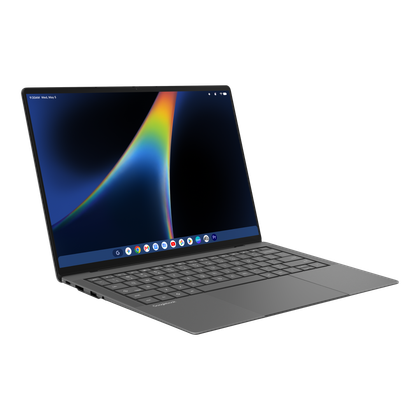
Asus’ Googlebook 14 (CX9406CAA) is one of the five initial Googlebook OS-powered PCs to hit the market in earnest. As I quickly found out, the $1,300 USD / $1,800 CAD laptop has a lot going for it, despite running an operating system that’s in its earliest of days. Here are my thoughts after testing out the computer in the real world and putting it through its paces.


4/5
- Operating System
-
Googlebook OS
- CPU
-
Intel Core Ultra 5 325
- GPU
-
Intel Integrated Graphics
- RAM
-
16 GB LPDDR5x
The Asus Googlebook 14 is a 14-inch laptop that runs the Android-based Googlebook OS, with an Intel Core Ultra Series 3 processor, a thin and lightweight chassis, and a variety of Gemini Intelligence AI features.
- Premium build quality
- Large haptic trackpad
- Gorgeous display panel
- Missing Ceraluminum
- Glowbar is superfluous
- Googlebook OS still a work in progress
Physical hardware par excellence
A refined, ruggedized exterior design

The Asus Googlebook 14 is a first-generation product, but you wouldn’t know that just by looking at it or holding it. Asus is very much flexing its industrial design prowess here, with the device featuring a gorgeous charcoal aesthetic (known officially as dusk ash), and being made of a premium CNC-machined magnesium-aluminum alloy. It’s not Ceraluminum (Asus’ in-house composite material that makes aluminum feel like ceramic), but it still feels excellent while repelling fingerprints in the process.
For a 14-inch class device, the laptop is exceptionally lightweight at only 2.18 lbs (0.99 kg), and it’s also quite thin at 12.24 x 8.38 x 0.43~0.65-inches (310.88 x 212.76 x 10.9~16.45 mm). Tolerances are tight, the hinge and weight distribution are tuned so that the lid can be lifted with a single finger, and the US military-grade MIL-STD-810H standard is achieved for ruggedness against altitude, high and low temperatures, solar radiation, vibrations, shocks, humidity, sand and dust, and more.
Thankfully, for the price, the laptop features excellent input across both its trackpad and its keyboard. The glass trackpad is large and comfortable, and, most notably, it features haptic technology to simulate a physical click rather than a rattlier diving board mechanism. The 1.5mm key travel on the chiclet-style keyboard is satisfying to press down upon, and its unique UV light coating offers a protective hard layer that’s smooth, tactile, and resistant to both scratches and smudges.
I/O wise, the device features 2x Thunderbolt 4 Type-C ports, 2x USB 3.2 Gen 2 Type-A ports, 1x HDMI 2.1 port, and a 3.5 mm headphone jack. This is a solid amount of expansion potential, especially when you consider how thin the chassis is. Other key specifications include a six-speaker 2W stereo configuration, a 70Wh battery pack, Wi-Fi 7, Bluetooth 6.0, a FHD webcam (with an included privacy shutter), a capacitive fingerprint sensor built into the power button, a rear-facing Glowbar (that’s of dubious utility beyond pulsing when interacting with Gemini),16GB of LPDDR5x RAM (configurable up to 64GB), and 256GB of M.2 PCIe Gen4 SSD internal storage (upgradable up to 1TB).
- Operating System
-
Googlebook OS
- CPU
-
Intel Core Ultra 5 325
- GPU
-
Intel Integrated Graphics
- RAM
-
16 GB LPDDR5x
- Storage
-
256 GB / 512 GB M.2 PCIe Gen4 SSD
- Battery
-
70 Wh
- Display (Size, Resolution)
-
14-inch 3K 120Hz touch screen
- Colors
-
Dusk Ash
- Ports
-
2x Thunderbolt 4 Type-C, 1x HDMI 2.1, 2x USB 3.2 Gen 2 Type-A, 1x 3.5mm audio jack
- Dimensions
-
12.24 x 8.38 x 0.43~0.65-inches (310.88 x 212.76 x 10.9~16.45 mm)
- Weight
-
2.18 lbs (0.99 kg)
- Brand
-
Asus
- Model
-
CX9406CAA
- Finish
-
CNC-machined magnesium-aluminum alloy
- Display type
-
OLED
- Audio
-
2W Stereo Speaker x2
- Webcam
-
FHD with webcam shutter
- Connectivity
-
Wi-Fi 7, Bluetooth 6.0
- Starting Price
-
$1,300
Plenty of compute power to boot
Intel’s Core Ultra Series 3 absolutely screams

Running the show internally is either the Intel Core Ultra 5 or the Ultra 7 Series 3 processor, which is built on the Intel 18A process technology for improved power efficiency. Graphics are integrated here, and there’s also a dedicated neural processing unit (NPU) for hardware-level artificial intelligence (AI) acceleration.
Despite being x86-64-based computing architecture, the Core Ultra Series 3 is rather power efficient while maintaining strong performance. In my testing, the computer never ran particularly hot, and seldom did the fancy Fluid Dynamic Bearing thermal system whirl up its fans to an audible degree. Asus says the fans run under 25dB under normal conditions, and, in my experience, this seems to be the case.
In Geekbench 7, the Asus Googlebook 14 achieved a CPU benchmark score of 2,519 in single-core and 11,050 in multi-core. It achieved an OpenCL GPU score of 7,851.
Asus quotes up to 16 hours of web browsing and up to 18 hours of video playback on the Googlebook 14, with the display set to 60Hz and 50 percent brightness. While it’s still too soon for me to fully get a grasp on battery life metrics, I can report that I’m getting a comfortable full day of usage out of the device with 120Hz on, 90 percent brightness, and multiple Bluetooth peripherals connected.
A genuinely brilliant display panel
Sharp, punchy, speedy, and usable outdoors

By far my favorite aspect of the Asus Googlebook 14 from a hardware perspective is its 14-inch display panel. The 3K OLED touchscreen is absolutely gorgeous, with a smooth 120Hz refresh rate, up to 1,000 nits of peak brightness, full 100 percent coverage of the DCI-P3 color gamut, and a 91 percent screen-to-body ratio.
This latter spec makes the device feel nice and modern, with small bezels that melt away when consuming content or getting work done. I do wish the display’s corners were subtly rounded, which would’ve given the package a more refined look and feel, but that’s my only real complaint.
The screen is covered in Corning Gorilla Glass Victus, which is an advanced tempered glass solution that prevents scratches and cracks from taking hold, and there’s also a Corning Gorilla Matte anti-glare surface treatment here. The matte display is silky smooth, and it significantly cuts down on reflections and fingerprints, but it won’t be to everyone’s taste. I’m personally a fan of matte displays, but I know many people prefer glossy ones, and so your mileage will vary.
Googlebook OS is a work in progress
Android underpinnings with a healthy helping of ChromeOS

What makes the Asus Googlebook 14 stand out from the crowd is that it’s one of the very first notebooks to run Googlebook OS. Fundamentally, the operating system is a modified version of mobile Android, complete with various ChromeOS desktop accommodations and underpinnings.
Interface wise, Googlebook OS looks and feels a lot like the Pixel UI found on modern Google smartphones like the Pixel 11 series. It’s clean, it’s got Material 3 Expressive design flourishes aplenty, and it’s relatively free of bloatware. I love how fluid the interface feels across both touch and mouse cursor modes, with simple gestures for invoking the app drawer, the notification pane, and the multitasking screen.
As with ChromeOS, Googlebook OS offers up a full desktop-class version of the Chrome web browser, complete with plug-ins and extensions. Progressive Web Applications (PWAs) integrate well into the system, but the main draw here is the ability to natively run any and all Android apps from the Play Store without any emulation, translation, or containerization technologies working behind the scenes.
…Googlebook OS doesn’t run legacy PC programs like the ones found on Windows 11.
Even on an Intel-based chipset, I found that Android apps all just work, with no qualms, hiccups, or stutters to speak of. That being said, in a statement to Android Authority, Google has confirmed that a small selection of apps are subject to experiencing compatibility problems, which will require developer intervention to rectify.
Of course, being an Android-based platform, Googlebook OS doesn’t run legacy PC programs like the ones found on Windows 11. With this in mind, there’s currently a lack of large-screen optimized applications for the operating system. Google highlights Adobe Photoshop and Premier, as well as Luminar, CapCut, Nvidia GeForce NOW, and a few other choice software products, but these are fundamentally mobile apps modified to work on larger screens rather than traditional programs in the PC sense.
Effectively, it’ll take some time for Googlebook OS to harness its full potential, and, for the time being, there isn’t much software available for the platform that can fully take advantage of the Intel Core Ultra Series 3 chipset. Googlebook OS is still in its infancy, to the point where it doesn’t even have access to certain ChromeOS Enterprise Upgrade and Education Upgrade management functionalities yet (Google says they’re arriving in the second half of 2027).
On the bright side, Googlebook OS is forward-thinking when it comes to AI. Gemini Intelligence is baked right into the system from day one, complete with Magic Pointer (invoking Gemini via a cursor wiggle), Rambler (voice-to-text with natural language), and Proactive Suggestions / Magic Cue (contextual surfacing of information based on what’s on your screen).
…Googlebook OS works incredibly well with Android-based smartphones right from day one.
I find Magic Cue particularly helpful, with it being similar in concept to Microsoft’s Click to Do feature on Copilot+ PCs. Wiggling the cursor is simple and intuitive, and it feels like the sort of AI feature that I would use on the regular as opposed to being a simple party trick. Rambler is also great for when I interact with Gemini’s chatbot function, though I haven’t found much utility in Proactive Suggestions as of yet.
Lastly, it’s worth mentioning that Googlebook OS works incredibly well with Android-based smartphones right from day one. Syncing of content is instantaneous when signed in via a Google Account, with Continue On allowing you to start tasks on your phone and continue them on your Googlebook. Quick Access lets you view, search, and insert files, photos, and downloads directly from your Android phone to your Googlebook, and Cast my Apps is always available on the taskbar for using your phone apps on the big screen sans full download.
Is the Asus Googlebook 14 worth buying?
A compelling package for those invested in the Android ecosystem

Overall, I’m a big fan of the Asus Googlebook 14 (CX9406CAA). The laptop is incredibly lightweight, premium to the touch, and fully specced from a computing standpoint. While I wish Asus had bestowed its excellent Ceraluminum material onto the device, the CNC-machined magnesium-aluminum alloy used here still feels excellent with its Nano Ceramic technology, and the addition of the US military-grade MIL-STD-810H standard is highly appreciated.
The laptop’s large haptic trackpad and UV-coated keyboard are a delight to use, and I’m fond of the anti-glare Gorilla Matte coating used on top of the Gorilla Glass Victus display glass. The touch-enabled display panel itself is brilliant, with 3K resolution, OLED punchiness, and a zippy 120Hz refresh rate to boot. Despite how thin and lightweight the Asus Googlebook 14 is, its six-speaker setup is surprisingly powerful with force-cancelling woofers and dual tweeters, too.
Battery life is more than solid for a full day of work and then some, the port selection is reasonable, and Intel’s latest portable chipset is powerful while maintaining efficiency. Of course, at $1,300 USD, the Asus Googlebook 14 isn’t a cheap device. And, for the price, it lacks most of the full-fat desktop PC programs that make using a Windows 11 or macOS computer so viable. There’s simply not enough here yet that takes advantage of the premium hardware under-the-hood.
There’s plenty to love about this hardware package overall…
To sweeten the pot a bit, the Asus Googlebook 14 does come with 12 months of Google AI Pro with 5TB of cloud storage (worth $240) out of the box, in addition to up to $350 in app subscription credit for a limited time. These launch offers do add considerable value to the package, though I’m not sure that they’re quite enough to sway PC and Mac diehards. Googlebook OS — with its Android underpinnings and its ChromeOS desktop stack — is off to a good start, to be sure, but the utility of Gemini Intelligence features will depend on your own workflow.
As with other first-generation Googlebooks, the Asus Googlebook 14 works effortlessly with Android handsets right out of the box, which is a huge boon for anyone invested in the broader Google ecosystem. There’s plenty to love about this hardware package overall, and as an omen of what’s to come in the Google-backed laptop space, the computer is good news all around. For web-based workflows, the Asus Googlebook 14 is easy to recommend, but keep in mind that, despite being a premium and pricey piece of kit, its app ecosystem is (for the time being) missing many of the heavy software hitters that would elevate the device to genuine greatness.
This device was provided to Pocket-lint by Asus.
4/5
- Operating System
-
Googlebook OS
- CPU
-
Intel Core Ultra 5 325
- GPU
-
Intel Integrated Graphics
- RAM
-
16 GB LPDDR5x
The Asus Googlebook 14 is a 14-inch laptop that runs the Android-based Googlebook OS, with an Intel Core Ultra Series 3 processor, a thin and lightweight chassis, and a variety of Gemini Intelligence AI features.